
What is an e-invoicing service provider?
An e-invoicing service provider is a platform or service that helps businesses submit electronic invoice data and receive the required results or statuses within the technical or regulatory environment in which they operate.
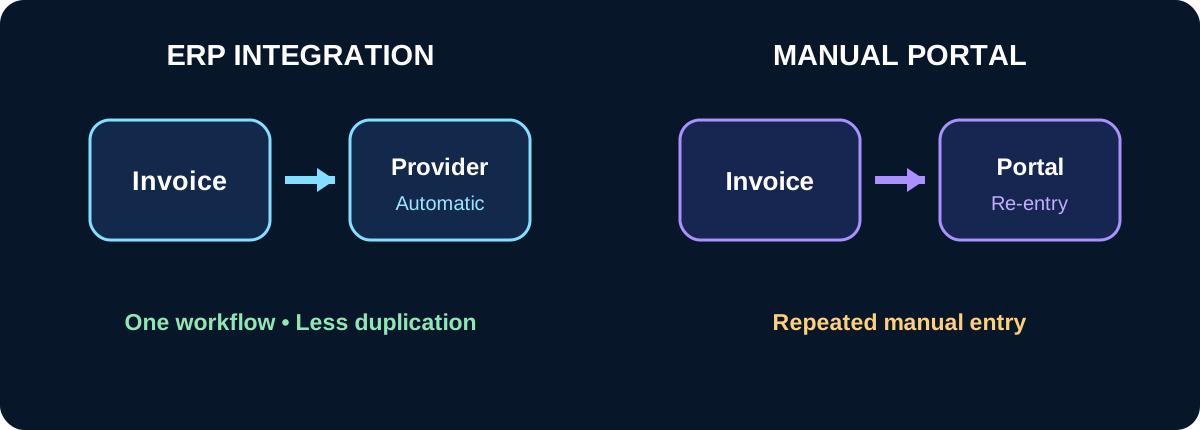
A provider may offer a standalone portal for manual entry, or direct integration that allows ERP to submit invoices and receive their status automatically.
Start with the key question: portal or ERP integration?
For a very small number of invoices, a provider portal may be sufficient. As invoice volume increases, repeatedly entering customer, item and amount information into separate systems becomes inefficient.
ERP integration allows the invoice to be created once and then exchanged with the provider while status information remains connected to the original business transaction.
1. Evaluate the quality of integration
Having an API does not automatically mean the integration is complete. What matters is whether it covers the workflow your business actually needs.
Check whether ERP can submit invoices, receive responses, display rejection reasons, retry after corrections and keep the response linked to the original accounting document.
- ✓ Direct invoice submission from ERP.
- ✓ Status retrieval after submission.
- ✓ Clear error messages.
- ✓ Resubmission after correction.
- ✓ A history of submission attempts.
2. Review reliability and service continuity
E-invoicing is part of the sales and accounting process, so service disruption can directly affect daily operations.
Ask how outages are handled, whether submissions can be queued, whether retries are supported and whether users can identify invoices that have not yet been processed.
3. Compare total cost, not only subscription price
A provider may appear cheaper initially while additional charges apply for setup, invoice volume, integration, support, annual renewal or extra services.
Compare the expected total cost over a full year rather than focusing only on the headline subscription fee.
- ✓ Setup or registration fees.
- ✓ Recurring subscription cost.
- ✓ Invoice volume limits.
- ✓ API or integration charges.
- ✓ Support and training charges.
- ✓ Costs associated with higher usage.
4. Test support quality
When an invoice is rejected or an unclear technical response appears, good support becomes more important than a long feature list.
Review available support channels, response times, escalation procedures and whether the support team can understand both accounting and technical issues.
5. Check how invoice status is presented
Users need more than a submit button. They need to clearly understand what happened after submission.
Useful systems present understandable states such as ready, processing, accepted, rejected or requiring review, together with enough detail to resolve problems.
6. Protect your audit trail and operational history
A business should not depend on employee memory to determine what happened to a particular invoice. Submission attempts, responses and corrections should be recorded clearly.
Ideally this information remains connected to the original invoice inside the business system instead of existing only in an external portal.
When is ERP integration the better option?
- ✓ When invoice volume is growing.
- ✓ When multiple employees work across sales and accounting.
- ✓ When reducing manual entry is important.
- ✓ When invoice status needs to be visible in one place.
- ✓ When a clear audit trail is required.
- ✓ When the business expects to expand across branches or entities.
Quick checklist before you decide
- ✓ Is the provider suitable for the market in which you operate?
- ✓ Does it support direct integration with your system?
- ✓ Are invoice statuses and errors clearly presented?
- ✓ Is total cost transparent?
- ✓ Is technical support responsive?
- ✓ Can you retain a complete operational history?
- ✓ Can the integration evolve without rebuilding your entire system?